

Travel sites Core Web Vitals problems usually come from the same few places: large hero images that load slowly, third-party scripts like booking widgets and map embeds that delay interactivity, and images or ads without reserved space that make the layout jump around. Those issues show up in the three Core Web Vitals metrics: Largest Contentful Paint, Interaction to Next Paint, and Cumulative Layout Shift. Fixing them makes travel pages faster and more pleasant to use, and while Core Web Vitals are a fairly light ranking signal on their own, poor page experience can hold back otherwise strong content in competitive results.
Travel content is uniquely demanding. It needs big, beautiful imagery to sell a destination, and it often relies on maps, booking tools, and affiliate widgets. All of that is expensive to load, which is why travel sites so often struggle with page experience compared with simpler content categories.
The Three Metrics and the Targets to Hit
Google measures Core Web Vitals using real-user data, and a page is considered to pass when at least 75 percent of visits meet the "good" threshold for each metric.
Largest Contentful Paint measures how quickly the largest visible element loads. A good score is 2.5 seconds or less. Interaction to Next Paint, which replaced First Input Delay as a Core Web Vital in March 2024, measures how quickly the page responds to clicks, taps, and key presses, with 200 milliseconds or less considered good. Cumulative Layout Shift measures how much the layout moves unexpectedly while loading, and a score of 0.1 or less is good.
Why Travel Sites Struggle With LCP
On most travel pages, the largest visible element is a full-width hero image of a beach, mountain, or city skyline. If that image is a large, uncompressed JPEG, LCP suffers no matter how fast the hosting is.
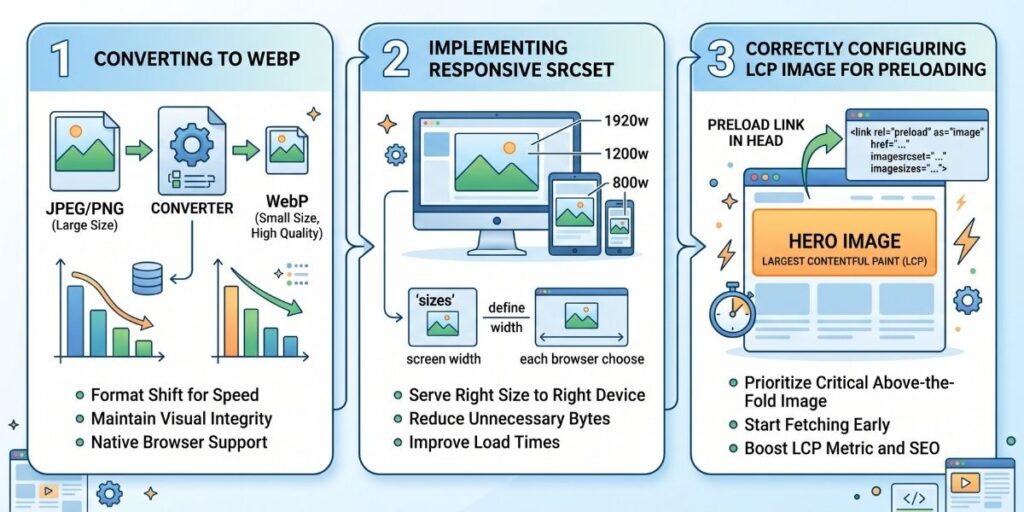
The fix is a combination of steps. Serve the hero image in a modern format like WebP or AVIF. Size it responsively, so mobile visitors are not downloading a desktop-sized file. Set explicit width and height attributes. Make sure the hero image is not lazy-loaded, because lazy loading the main above-the-fold image delays the very element LCP measures. And signal its importance to the browser, either by preloading it or using the fetchpriority attribute.
Applied together, these changes often make a significant difference to LCP on image-heavy travel pages.
Why Travel Sites Struggle With INP
INP problems on travel sites usually come from third-party JavaScript. Booking widgets, affiliate scripts, embedded maps, social sharing tools, and ad scripts can all keep the browser busy, so when a visitor taps a button or menu, the page responds slowly.
The fix starts with an audit. List every third-party script on your key templates and ask whether each one earns its place. Remove the ones that do not. For those that remain, load them in a way that does not block the main content, using async or defer, or delay non-essential scripts until after the page becomes interactive.
Why Travel Sites Struggle With CLS
Layout shift happens when content moves as the page loads, often because images, ads, embedded maps, or widgets load in without reserved space. On a travel page, that can mean text jumping just as someone starts reading, or a button moving right before they tap it.
The fix is to reserve space for everything that loads later. Set width and height on all images, use CSS aspect-ratio or minimum heights for embeds and ad slots, and avoid inserting banners or notices above existing content after the page has started rendering.
The Travel Sites Core Web Vitals Fixes That Matter Most
For most travel sites, image optimization delivers the biggest return and should come first. Converting to modern formats, serving responsive sizes, and correctly handling the hero image often fixes the largest share of LCP problems in a single pass.
Replacing live map embeds is usually next. An interactive embedded map loads a significant amount of JavaScript. A lightweight alternative, such as a static map image that links to the full interactive map, or a click-to-load map that only loads when a visitor asks for it, keeps the location context without the performance cost.
Font loading is the third area worth reviewing. Limit the number of font families and weights, preload the critical ones, and use font-display: swap so text appears immediately while custom fonts load.
What Better Scores Can and Cannot Do
It is important to keep expectations realistic. Google has said that Core Web Vitals are used by its ranking systems, but that great page experience does not override great content. A fast page with weak, generic content will not outrank a slower page that genuinely answers the searcher better. In practice, Core Web Vitals tend to matter most when competing pages are otherwise closely matched.
It also takes time for improvements to show up. Google's Core Web Vitals data comes from real Chrome users over a rolling 28-day window, so changes are reflected gradually. Requesting indexing in Search Console can prompt Google to recrawl a page, but it does not speed up the field data that Core Web Vitals assessments rely on.
How to Track Progress
Use Search Console's Core Web Vitals report to see which groups of URLs pass or fail, based on real-user data. Use PageSpeed Insights to diagnose specific pages, where you can see both field data and lab data with detailed recommendations. Fix the templates that affect the most pages first, since one change to a template can improve hundreds of URLs at once.
The Bottom Line
Travel sites struggle with Core Web Vitals for predictable reasons: heavy imagery, third-party scripts, and content that loads without reserved space. Optimize your hero images first, tame third-party scripts, lighten map embeds, and reserve space for everything that loads late. Better page experience will not rescue weak content, but for strong travel content competing in crowded results, it can be the difference that keeps you ahead.

David Brauksworth is KatvTech’s Technical SEO Analyst, specializing in Core Web Vitals, crawl budget, and site architecture. He runs controlled CWV and indexing experiments and tracks pattern shifts across Google’s core and spam updates.